Absolute, Relative and Root Relative URLs
The same page, three ways to point at it. Learn how a browser resolves each form, when a leading slash saves you, and why one broken dot breaks an entire folder of links.
-
HTML Basics
- What is HTML: The Structure Layer of Every Web Page
- HTML Document Structure: DOCTYPE, html, head and body
- Elements, Tags and Attributes: The Vocabulary of HTML
- HTML Comments: Notes That Ship With Your Code
- Block Level and Inline Elements
- Writing and Running Your First HTML Page
- How a Browser Turns Markup Into a Page
- Text and Formatting
- Links and Navigation
- Images and Media
- Lists
- Tables
-
Forms
- Form Structure: form, action and method
- Input Types: Text, Email, Number, Date and the Rest
- Labels: The Most Important Element in a Form
- Checkboxes, Radio Buttons and Grouping
- select, option, optgroup and datalist
- textarea, File Uploads and Hidden Fields
- Buttons: submit, reset and button
- Built In Form Validation
- GET or POST: What Happens When a Form Is Submitted
- Semantic HTML
- HTML5 Features
- Head and Metadata
- HTML with CSS
- HTML with JavaScript
- Accessibility
-
HTML SEO
- How Google Works: Crawling, Indexing and Ranking
- SEO Friendly HTML Structure
- Titles and Descriptions That Earn Clicks
- Headings and Content Structure for Search
- Internal Linking and Anchor Text
- robots.txt and XML Sitemaps
- Canonical URLs and Duplicate Content
- Structured Data and JSON-LD
- Image SEO
- Core Web Vitals and Mobile Friendliness
- DevTools and Debugging
- Editor Productivity
- HTML Best Practices
- HTML Projects
- Advanced Projects
- Practice and Exams
Concept
A URL in an href or a src is either absolute - complete in itself - or relative, meaning the browser has to work out the rest from the address of the page it is currently on. Relative URLs come in two flavours, and confusing them is behind a large share of broken links.
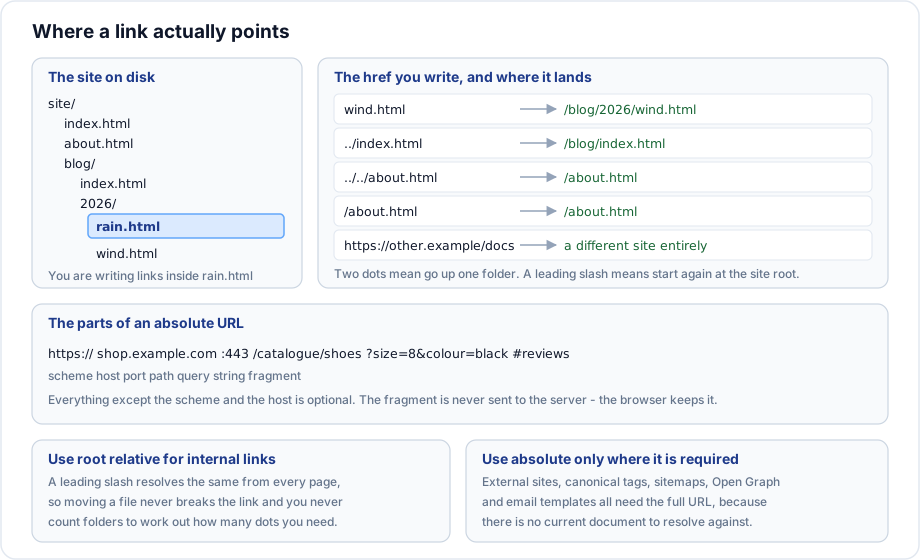
The anatomy of an absolute URL
https://shop.example.com:443/catalogue/shoes?size=8&colour=black#reviews
  |            |            |        |              |               |
scheme host port path query string fragment| Part | What it does |
|---|---|
| Scheme | The protocol. Use https. |
| Host | Which server. example.com and www.example.com are different hosts. |
| Port | Almost always omitted; 443 for https, 80 for http. |
| Path | Which resource on that server. |
| Query string | Named parameters after a question mark, joined by ampersands. |
| Fragment | An id within the page. Never sent to the server. |
The three forms
Absolute
<a href="https://example.org/reports/2026">The report</a>Points at the same place from anywhere on earth. Required for external links, and for anything a machine reads outside the page: canonical tags, sitemaps, Open Graph images, RSS feeds, email templates.
Root relative
<a href="/about">About us</a>
<img src="/images/logo.svg" alt="Company logo">
The leading slash means start again at the root of this site. The current folder is irrelevant, so the same string works from every page in the site. This is the right default for internal links.
One caveat: if the site is deployed into a subfolder such as example.com/docs/, a leading slash escapes that folder and lands at the domain root. Sites in a subfolder need either a build step that adds the prefix or a <base> element.
Document relative
<a href="wind.html">Same folder</a>
<a href="drafts/notes.html">Down one folder</a>
<a href="../index.html">Up one folder</a>
<a href="../../about.html">Up two folders</a>
<a href="./wind.html">Explicitly this folder</a>
Resolved against the folder of the current document. Convenient in a small flat site, fragile in a deep one, and it breaks the moment a file moves.
Example
The site tree, and links written from inside /blog/2026/rain.html:
site/
  index.html
  about.html
  blog/
    index.html
    2026/
      rain.html    <- you are here
wind.html| You write | Browser requests |
|---|---|
wind.html | /blog/2026/wind.html |
../index.html | /blog/index.html |
../../about.html | /about.html |
/about.html | /about.html |
//example.org/x | https://example.org/x - a different site |
That last row is the protocol relative form and it is a trap. Two leading slashes mean another host, same protocol. Writing //images/logo.png when you meant /images/logo.png sends the browser looking for a host called images.
Trailing slashes matter
To a server, /blog and /blog/ can be two different things, and relative links resolve differently from each.
From /blog/    a link to "post.html"  ->  /blog/post.html
From /blog     a link to "post.html"  ->  /post.html
Most servers redirect a folder request to add the slash, which is why this usually goes unnoticed - until the day one does not. Pick one convention for the site and redirect the other form to it.
Important rules
- URLs use forward slashes on every operating system, including Windows.
- URLs on most servers are case sensitive.
/Aboutand/aboutare different pages, even though your local Windows machine cannot tell them apart. - A space in a path must be encoded as
%20. Avoid spaces in file names entirely. - The fragment is handled by the browser and never reaches the server.
<base href="...">changes what every relative URL on the page resolves against. It affects every link, image, script and stylesheet, so use it deliberately or not at all.
Common mistakes
- Counting
../segments wrongly and breaking every link in a folder at once. - Writing
//images/x.pnginstead of/images/x.pngand sending the browser off site. - Using a document relative URL in a canonical tag or a sitemap, where an absolute URL is mandatory.
- Mixing case between the file on disk and the link. It works on Windows and fails on the server.
- Using a backslash out of habit.
- Hardcoding
http://localhost:8000/into links and shipping it.
Best practices
- Root relative for internal links and assets. Absolute for external links and for anything a machine consumes.
- Keep URLs lower case, hyphenated and free of spaces.
- Choose one trailing slash convention and enforce it with a redirect.
- Do not put the file extension in public URLs if the server can serve clean paths;
/aboutages better than/about.html. - Run a link checker before every release. Broken internal links waste crawl budget and frustrate readers.
Practice
- From
/blog/2026/rain.html, write links to/index.html,/blog/index.htmland/blog/2026/wind.htmlin both relative and root relative form. - Move
rain.htmlup into/blog/. Which of your links broke, and which survived? - Explain what
//cdn.example.com/a.jsrequests and why it is rarely what a beginner means. - Add a
<base href="/docs/">to a page and describe what happens to every relative URL on it.