How Google Works: Crawling, Indexing and Ranking
Four stages between publishing a page and someone finding it. Knowing which stage a problem sits in is what turns SEO from guesswork into debugging.
-
HTML Basics
- What is HTML: The Structure Layer of Every Web Page
- HTML Document Structure: DOCTYPE, html, head and body
- Elements, Tags and Attributes: The Vocabulary of HTML
- HTML Comments: Notes That Ship With Your Code
- Block Level and Inline Elements
- Writing and Running Your First HTML Page
- How a Browser Turns Markup Into a Page
- Text and Formatting
- Links and Navigation
- Images and Media
- Lists
- Tables
-
Forms
- Form Structure: form, action and method
- Input Types: Text, Email, Number, Date and the Rest
- Labels: The Most Important Element in a Form
- Checkboxes, Radio Buttons and Grouping
- select, option, optgroup and datalist
- textarea, File Uploads and Hidden Fields
- Buttons: submit, reset and button
- Built In Form Validation
- GET or POST: What Happens When a Form Is Submitted
- Semantic HTML
- HTML5 Features
- Head and Metadata
- HTML with CSS
- HTML with JavaScript
- Accessibility
-
HTML SEO
- How Google Works: Crawling, Indexing and Ranking
- SEO Friendly HTML Structure
- Titles and Descriptions That Earn Clicks
- Headings and Content Structure for Search
- Internal Linking and Anchor Text
- robots.txt and XML Sitemaps
- Canonical URLs and Duplicate Content
- Structured Data and JSON-LD
- Image SEO
- Core Web Vitals and Mobile Friendliness
- DevTools and Debugging
- Editor Productivity
- HTML Best Practices
- HTML Projects
- Advanced Projects
- Practice and Exams
Concept
A page goes through four distinct stages before anyone can find it in search. Most SEO problems are really a failure at one specific stage, and the fix depends entirely on which one.
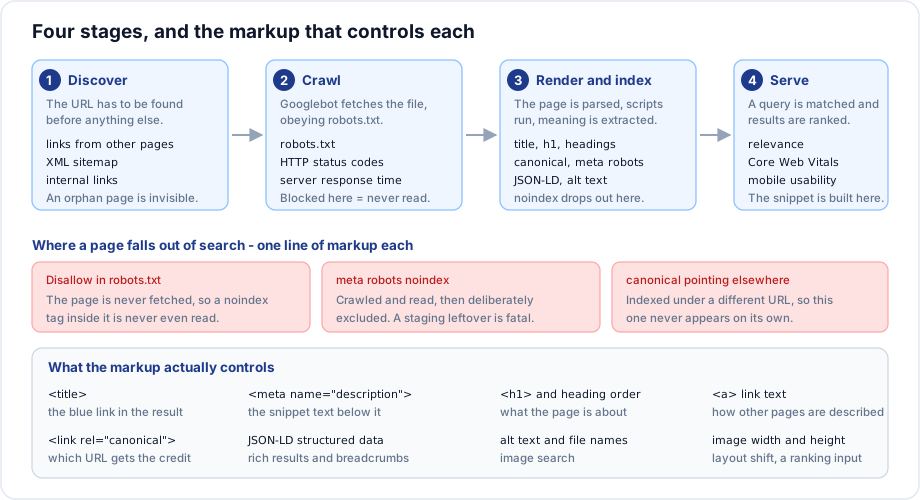
1. Discovery
Before anything else, the URL has to be found. There are three routes:
- Links from pages already known, internal or external. This is the main one.
- An XML sitemap submitted or referenced from
robots.txt. - A direct request through Search Console.
A page with no links pointing at it and no sitemap entry is an orphan. It exists, and nothing will ever find it. Publishing is not enough.
2. Crawling
Googlebot requests the URL. Several things can stop it:
robots.txtdisallows the path.- The server returns an error, or is too slow.
- The page requires a login.
- The site has exhausted its crawl budget on low value URLs.
Crawl budget is roughly how many pages a crawler will fetch from your site in a period. On a small site it is never a constraint. On a large one, thousands of near duplicate filtered URLs can consume it and leave real pages uncrawled.
3. Rendering and indexing
The HTML is parsed, JavaScript is executed, and the page is analysed: the title, headings, body text, links, images, structured data and canonical tag.
Rendering is worth a note. Google does execute JavaScript, but rendering happens in a separate pass and can be delayed. A page whose content only exists after a client side fetch may be crawled, seen as empty, and rendered days later. Content that matters should be in the HTML the server sends.
The page is dropped at this stage if it carries noindex, if a canonical points elsewhere, or if it is judged a duplicate of something already indexed.
4. Serving and ranking
For a given query, candidate pages are selected and ordered. The ordering uses a large number of signals; the ones you influence directly through markup are:
- Whether the content matches the query.
- The title, headings and structure.
- Links pointing at the page and the text of those links.
- Page experience: Core Web Vitals, mobile usability, HTTPS.
- Structured data, which affects how the result is displayed rather than where it ranks.
Where problems actually live
| Symptom | Stage | Check |
|---|---|---|
| Page not in search at all | Discovery or crawling | Sitemap, internal links, robots.txt |
| Crawled but not indexed | Indexing | noindex, canonical, thin content |
| Indexed under a different URL | Indexing | Canonical tag |
| Indexed but ranks poorly | Ranking | Content, title, links |
| Ranks well, nobody clicks | Serving | Title and description |
Diagnosing the stage first saves a great deal of wasted effort. Rewriting content will not help a page that is blocked in robots.txt.
Search Console
Google Search Console is free, and it is the only place you can see what Google actually did with your pages rather than what you assume.
The reports worth knowing:
| Report | Answers |
|---|---|
| URL Inspection | Is this specific page indexed, and if not, why? |
| Pages | Which pages are indexed and which were excluded, with reasons |
| Performance | Which queries show your pages, and the clicks each gets |
| Core Web Vitals | Real visit performance data |
| Sitemaps | Whether your sitemap was read and how many URLs it contained |
| Enhancements | Whether structured data was understood |
Verify ownership by adding a meta tag to the head or a file to the site root:
<meta name="google-site-verification" content="...">Set it up on the day a site launches, not months later. The historical data only starts from verification.
What the markup controls
<head>
  <title>Design Course - Riverside College</title>
  <meta name="description" content="A three year studio based design course in Pune.">
  <link rel="canonical" href="https://example.edu/courses/design">
  <meta name="robots" content="index, follow">
</head>
<body>
  <h1>Design course</h1>
  <main>
    <article>
      <h2>What you will study</h2>
      <p>...</p>
    </article>
  </main>
</body>
Every line here maps to something in the pipeline: the title becomes the blue link, the description becomes the snippet, the canonical decides which URL is credited, the robots tag decides whether the page is listed, and the headings tell the crawler what the page covers.
What SEO is not
- The keywords meta tag. Ignored by every major search engine for well over a decade.
- Keyword density. Repeating a phrase a fixed number of times is not how modern ranking works.
- Hidden text. Text hidden with CSS to feed a crawler is a policy violation and risks a manual penalty.
- Buying links. Same.
- A one time task. Content and competitors both change.
Important rules
- A page must be discoverable, crawlable and indexable before ranking is even relevant.
robots.txtcontrols crawling;noindexcontrols indexing. They are different stages.- Content behind JavaScript can be indexed late or not at all.
- Indexing is not guaranteed. Google may crawl a page and decide not to list it.
- Search Console shows what actually happened.
Common mistakes
- Rewriting content for a page that is blocked from crawling.
- Assuming publishing is enough, with no internal links or sitemap.
- Shipping a staging
noindexto production. - Rendering all content client side and expecting immediate indexing.
- Never setting up Search Console.
- Blocking CSS and JavaScript in
robots.txt, so Google cannot render the page properly.
Best practices
- Verify Search Console on launch day.
- Submit an XML sitemap and keep it accurate.
- Link every page from at least one other page.
- Serve the important content in the initial HTML.
- Audit for stray
noindextags before every release. - Diagnose by stage before changing anything.
Practice
- Use URL Inspection on one of your pages and read exactly what Google recorded.
- Find a page on your site with no internal links pointing at it.
- Disable JavaScript and reload a page. What content disappeared?
- For each of the five symptoms in the table, name the first thing you would check.