HTML Document Structure: DOCTYPE, html, head and body
Every page is built from the same four parts. Learn what the doctype actually does, why html carries the lang attribute, and the rule that decides whether content belongs in head or body.
-
HTML Basics
- What is HTML: The Structure Layer of Every Web Page
- HTML Document Structure: DOCTYPE, html, head and body
- Elements, Tags and Attributes: The Vocabulary of HTML
- HTML Comments: Notes That Ship With Your Code
- Block Level and Inline Elements
- Writing and Running Your First HTML Page
- How a Browser Turns Markup Into a Page
- Text and Formatting
- Links and Navigation
- Images and Media
- Lists
- Tables
-
Forms
- Form Structure: form, action and method
- Input Types: Text, Email, Number, Date and the Rest
- Labels: The Most Important Element in a Form
- Checkboxes, Radio Buttons and Grouping
- select, option, optgroup and datalist
- textarea, File Uploads and Hidden Fields
- Buttons: submit, reset and button
- Built In Form Validation
- GET or POST: What Happens When a Form Is Submitted
- Semantic HTML
- HTML5 Features
- Head and Metadata
- HTML with CSS
- HTML with JavaScript
- Accessibility
-
HTML SEO
- How Google Works: Crawling, Indexing and Ranking
- SEO Friendly HTML Structure
- Titles and Descriptions That Earn Clicks
- Headings and Content Structure for Search
- Internal Linking and Anchor Text
- robots.txt and XML Sitemaps
- Canonical URLs and Duplicate Content
- Structured Data and JSON-LD
- Image SEO
- Core Web Vitals and Mobile Friendliness
- DevTools and Debugging
- Editor Productivity
- HTML Best Practices
- HTML Projects
- Advanced Projects
- Practice and Exams
Concept
Every HTML file, from a one line test page to a large application, has the same skeleton: a doctype, a single html root element, a head for information about the page, and a body for the page itself.
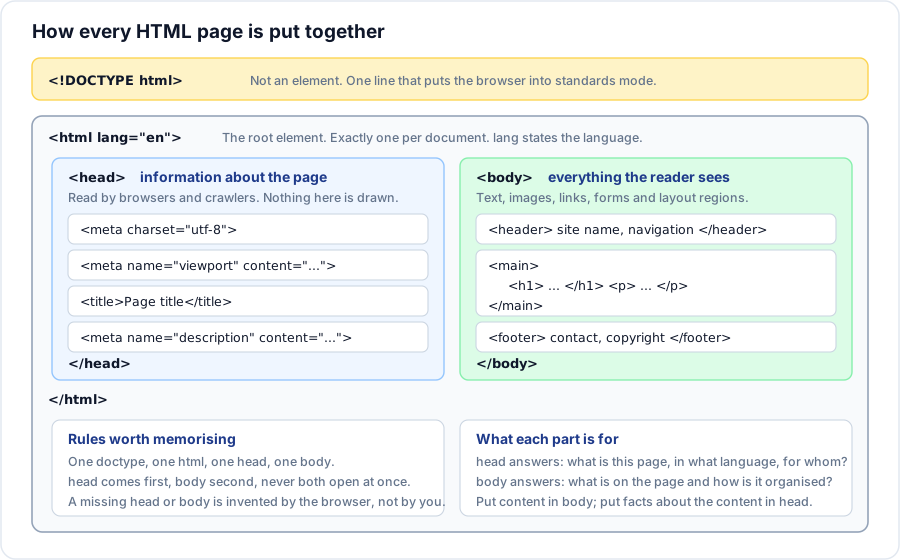
Syntax
<!DOCTYPE html>
<html lang="en">
  <head>
    <!-- information about the page -->
  </head>
  <body>
    <!-- the page itself -->
  </body>
</html>
What each part is for
The doctype
<!DOCTYPE html> is not an element and not a tag. It is a single instruction that must be the first thing in the file, before any blank line or comment. Its only job today is to switch the browser into standards mode.
Leave it out and the browser falls into quirks mode, where it deliberately reproduces the layout bugs of browsers from the late nineteen nineties so that very old pages still work. In quirks mode box sizing, table cell heights, inline block alignment and several inherited properties all behave differently. Nothing announces this. The page simply lays out wrongly and every hour you spend on the stylesheet is wasted.
The doctype is case insensitive and takes no attributes. Older doctypes were long strings pointing at a document type definition; modern HTML needs only the short form.
The html element
The root of the tree. There is exactly one of these per document and everything else lives inside it. It carries the lang attribute, which is far more useful than it looks:
- Screen readers pick the correct pronunciation rules and voice.
- Browsers offer the right translation, and apply the right hyphenation and quotation marks.
- Search engines use it as one signal of who the page is for.
<html lang="en">      <!-- English -->
<html lang="en-IN">   <!-- English as written in India -->
<html lang="hi">      <!-- Hindi -->
The head element
The head holds information about the document rather than the document itself. Nothing in it is painted on the page. It is where the character encoding, the viewport rule, the page title, the search description, the stylesheet links and the favicon go.
One entry in the head is genuinely urgent. The browser has to know the character encoding before it can decode the bytes it is reading, so <meta charset="utf-8"> should be the first thing inside the head. If it appears too late, the browser has already guessed, and a wrong guess is what produces the familiar row of mangled symbols where an accented letter or a rupee sign should be.
The body element
Everything a reader sees. Headings, paragraphs, images, links, lists, tables, forms and the layout regions that group them. Markup order in the body is reading order: it is the order a screen reader announces, the order the keyboard moves through, and the order the page paints in.
Example
<!DOCTYPE html>
<html lang="en-IN">
<head>
  <meta charset="utf-8">
  <meta name="viewport" content="width=device-width, initial-scale=1">
  <title>Kavya Rao - Front End Developer</title>
  <meta name="description" content="Portfolio of Kavya Rao, a front end developer working on accessible interfaces.">
  <link rel="icon" href="/favicon.svg" type="image/svg+xml">
  <link rel="stylesheet" href="/styles/site.css">
</head>
<body>
  <header>
    <p>Kavya Rao</p>
    <nav>
      <a href="/work">Work</a>
      <a href="/about">About</a>
    </nav>
  </header>

  <main>
    <h1>Front end developer, Bengaluru</h1>
    <p>I build interfaces that stay usable on a slow connection.</p>
  </main>

  <footer>
    <p>Written in 2026.</p>
  </footer>

  <script src="/scripts/site.js" defer></script>
</body>
</html>
Explanation
The head answers four questions before a single pixel is drawn: how are these bytes encoded, how wide should the page consider the screen to be, what is this page called, and what does it cover. The body then answers a fifth: what is actually here, and in what order.
The stylesheet is linked in the head because the browser needs it before painting; a stylesheet discovered late causes a flash of unstyled content. The script sits at the end of the body with defer, so it never delays the parser and it runs once the document is complete.
Important rules
- The doctype comes first. Not after a comment, not after a blank line, not after a stray space.
- One
html, onehead, onebodyper document, in that order, never overlapping. <meta charset="utf-8">belongs in the first bytes of the head.- The
headandbodytags are technically optional - the parser invents them - but writing them is the only way to be sure the split lands where you intended. - Anything the parser finds in the head that does not belong there ends the head early and silently starts the body.
Common mistakes
- Copying an old four line doctype from a tutorial. Modern HTML needs the short form and nothing else.
- Omitting
lang, which is a one word fix and an accessibility failure that automated audits will always flag. - Putting visible content such as a heading inside the head. It ends the head, and the page renders in a way that will confuse you for an hour.
- Declaring the encoding halfway down the head, after a title containing a non ASCII character. The damage is already done by then.
- Writing two
bodyelements after copying a template into an existing page. The parser merges them and the result is rarely what you wanted.
Best practices
- Keep the head in a fixed order: charset, viewport, title, description, canonical, icons, stylesheets. It makes reviews fast and mistakes obvious.
- Set
langon the root, and set it again on any element whose text is in a different language. - Load scripts with
deferso parsing is never blocked. - Indent by nesting level. The structure of the file should be visible from ten feet away.
Practice
- Delete the doctype from a page you have styled and reload it. Note every layout difference you can see, then put it back.
- Move
<title>into the body and open the page. Where does the text appear, and what happened to the browser tab? - Write the skeleton of a page in Hindi. Which single attribute changes, and what does that change for a screen reader?