Why Semantic HTML Matters
Two pages can look identical and be worlds apart. Semantic markup is what tells browsers, screen readers and search engines what each part of a page actually is.
- Concept
- The comparison
- What semantic markup actually buys
- 1. Assistive technology can navigate
- 2. Search engines understand structure
- 3. Browser features start working
- 4. The code becomes readable
- Choosing the element
- The most expensive mistakes
- A div as a button
- A div as a link
- A div as a heading
- A quick self test
- Important rules
- Common mistakes
- Best practices
- Practice
-
HTML Basics
- What is HTML: The Structure Layer of Every Web Page
- HTML Document Structure: DOCTYPE, html, head and body
- Elements, Tags and Attributes: The Vocabulary of HTML
- HTML Comments: Notes That Ship With Your Code
- Block Level and Inline Elements
- Writing and Running Your First HTML Page
- How a Browser Turns Markup Into a Page
- Text and Formatting
- Links and Navigation
- Images and Media
- Lists
- Tables
-
Forms
- Form Structure: form, action and method
- Input Types: Text, Email, Number, Date and the Rest
- Labels: The Most Important Element in a Form
- Checkboxes, Radio Buttons and Grouping
- select, option, optgroup and datalist
- textarea, File Uploads and Hidden Fields
- Buttons: submit, reset and button
- Built In Form Validation
- GET or POST: What Happens When a Form Is Submitted
- Semantic HTML
- HTML5 Features
- Head and Metadata
- HTML with CSS
- HTML with JavaScript
- Accessibility
-
HTML SEO
- How Google Works: Crawling, Indexing and Ranking
- SEO Friendly HTML Structure
- Titles and Descriptions That Earn Clicks
- Headings and Content Structure for Search
- Internal Linking and Anchor Text
- robots.txt and XML Sitemaps
- Canonical URLs and Duplicate Content
- Structured Data and JSON-LD
- Image SEO
- Core Web Vitals and Mobile Friendliness
- DevTools and Debugging
- Editor Productivity
- HTML Best Practices
- HTML Projects
- Advanced Projects
- Practice and Exams
Concept
Semantic HTML means choosing elements for what the content is rather than for how it should look. A nav is navigation. An article is a self contained piece of writing. A button performs an action.
The alternative - a page built entirely from div and span with descriptive class names - renders identically. That is exactly what makes the problem invisible: nothing looks wrong, and yet the page has thrown away every piece of meaning it could have carried.
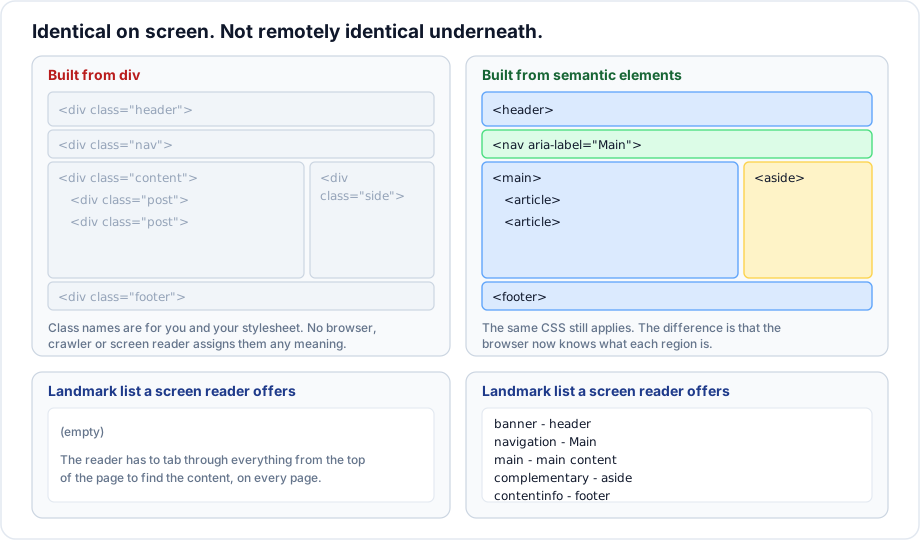
The comparison
<!-- looks right, means nothing -->
<div class="header">
  <div class="nav">
    <div class="nav-item">Home</div>
  </div>
</div>
<div class="content">
  <div class="title">Admission 2026</div>
  <div class="text">Applications open in June.</div>
</div>

<!-- looks the same, carries meaning -->
<header>
  <nav aria-label="Main">
    <ul><li><a href="/">Home</a></li></ul>
  </nav>
</header>
<main>
  <h1>Admission 2026</h1>
  <p>Applications open in June.</p>
</main>
Class names are invisible to every consumer of the page except your stylesheet. The browser does not know that class="nav" is navigation. It has no dictionary of class names, and it never will.
What semantic markup actually buys
1. Assistive technology can navigate
Screen readers offer a landmark list, a heading list and a link list. Those lists are built from elements, not classes. On the semantic page a reader presses one key to jump to the main content; on the div page they tab through the entire header on every single page.
Beyond landmarks, elements carry behaviour: a button is focusable and responds to Enter and Space; a div with a click handler is invisible to a keyboard entirely.
2. Search engines understand structure
Crawlers weight content differently by where it sits. Text inside main or article is the page. Text inside nav or footer is repeated furniture. The h1 is the topic. Link text describes the destination. None of this is inferable from a div.
3. Browser features start working
Reading modes, article extraction, print stylesheets and translation tools all look for semantic structure. A page of divs is silently ineligible for all of them.
4. The code becomes readable
Six months later, </main> tells you what closed. </div> at the end of two hundred lines of nesting tells you nothing.
Choosing the element
A short decision list that covers most real cases:
| The content is | Use |
|---|---|
| The page topic | h1 |
| A major section heading | h2 to h6 |
| The main content region | main |
| A block of navigation links | nav |
| Independently meaningful content | article |
| A thematic grouping | section |
| Tangential content | aside |
| Site or section introduction | header |
| Site or section closing | footer |
| An action | button |
| A destination | a href |
| A group of items | ul or ol |
| Two dimensional data | table |
| A date or time | time |
| Contact details | address |
| Nothing above fits | div or span |
The most expensive mistakes
A div as a button
<!-- not focusable, no keyboard, no role, no disabled state -->
<div class="btn" onclick="submit()">Submit</div>

<button type="submit">Submit</button>
A div as a link
<!-- cannot be opened in a new tab, copied, bookmarked or crawled -->
<div onclick="location.href='/about'">About</div>

<a href="/about">About</a>
A div as a heading
<!-- absent from the document outline -->
<div class="section-title">Fees</div>

<h2>Fees</h2>
A quick self test
Open the page and switch the stylesheet off. If what remains reads as a sensible document - a title, sections in order, a list that looks like a list, a form with labels - the markup is sound. If it collapses into an undifferentiated wall of text, the meaning was in the CSS, and CSS is not where meaning belongs.
Important rules
- Semantics come from elements. Class names carry none.
- CSS can make any element look like any other; it cannot change what the element means.
- A native element beats a
divwith ARIA attributes bolted on. The first rule of ARIA is not to use ARIA when HTML already has the element. - Semantic markup is not slower, larger or harder. It is usually shorter.
- There is no penalty for using
divwhere nothing meaningful applies.
Common mistakes
- Believing a class name conveys meaning to anything but your stylesheet.
- Clickable
divelements throughout an interface. - Styled text standing in for headings.
- Adding
role="button"to adivinstead of using abutton. - Wrapping everything in
sectionbecause it sounds more modern thandiv. - Treating accessibility as a final pass rather than as the element choice you already made.
Best practices
- Ask what the content is before asking which tag to type.
- Reach for
divandspanlast, not first. - Use native interactive elements:
button,a,input,select,details. - Read the page with the stylesheet off before shipping.
- Run an accessibility audit and read the landmark list.
- Validate. Many semantic errors are also validity errors.
Practice
- Take a page built from divs and convert it to semantic elements without touching the CSS. Confirm it looks unchanged.
- Disable CSS on any site you use and describe what survives.
- Open the accessibility panel in DevTools and list the landmarks on one of your own pages.
- Find a clickable
divin a real interface and list everything a keyboard user cannot do with it.