BEGIN, COMMIT, ROLLBACK and Savepoints
Grouping statements into one unit of work that either fully applies or fully undoes. Learn transaction boundaries, savepoints, autocommit and what silently ends a transaction.
- SQL Basics
- DDL
- DML
- SELECT
- WHERE
- Functions
- NULL and Logic
- Aggregate Functions
- GROUP BY
- JOIN
- Subqueries
- Set Operations
- CTEs
- Constraints
- Keys
- Relationships
- Database Design
- Normalisation
- Views
- Window Functions
- Advanced SQL
- Procedures and Functions
- Triggers
- Temporary Tables
- Transactions
- Isolation and Locking
- Indexes
- Query Performance
- SQL Security
- SQL Dialects
- Practical SQL
Concept
A transaction is a group of statements treated as one indivisible unit. Either every statement takes effect, or none of them do. The classic example is a transfer: two updates that must both happen or neither.
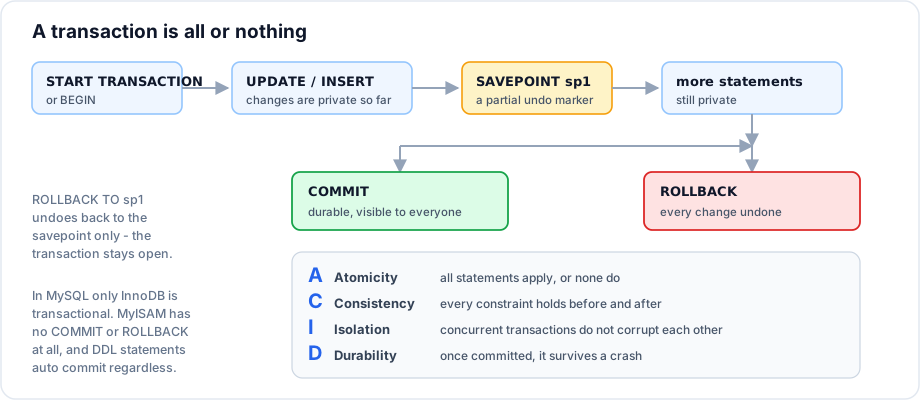
Syntax
START TRANSACTION;      -- or BEGIN, or BEGIN WORK
    -- statements
COMMIT;                 -- make it permanent
-- or
ROLLBACK;               -- undo everything since the start

SAVEPOINT name;
ROLLBACK TO SAVEPOINT name;
RELEASE SAVEPOINT name;
Example
START TRANSACTION;

    UPDATE accounts SET balance = balance - 5000 WHERE id = 1;
    UPDATE accounts SET balance = balance + 5000 WHERE id = 2;

COMMIT;
Without the transaction, a crash or an error between the two statements destroys 5000 rupees. The debit is committed, the credit never happens, and no error message anywhere says the money is gone. The transaction makes that outcome impossible.
-- The safe update pattern from the DML notes, made explicit
START TRANSACTION;

    UPDATE employees SET salary = salary * 1.10 WHERE dept_id = 10;
    SELECT id, first_name, salary FROM employees WHERE dept_id = 10;   -- inspect

COMMIT;      -- looks right
-- ROLLBACK; -- looks wrong
Savepoints
START TRANSACTION;

    INSERT INTO orders (id, customer_id, order_date, status, total)
    VALUES (2000, 1, '2024-10-01', 'pending', 0);

    SAVEPOINT order_created;

    INSERT INTO order_items (order_id, product_id, quantity, unit_price)
    VALUES (2000, 1, 2, 4999.00);

    INSERT INTO order_items (order_id, product_id, quantity, unit_price)
    VALUES (2000, 99, 1, 100.00);      -- product 99 does not exist

    ROLLBACK TO SAVEPOINT order_created;   -- undo the line items only

    UPDATE orders SET status = 'draft' WHERE id = 2000;

COMMIT;   -- the order survives, without its bad lines
A savepoint is a marker inside a transaction. ROLLBACK TO SAVEPOINT undoes the work after the marker and leaves the transaction open. It is the tool for long procedures where one optional step failing should not discard everything.
Autocommit
SELECT @@autocommit;      -- 1 by default in MySQL

-- With autocommit on, each statement is its own transaction:
UPDATE employees SET salary = 90000 WHERE id = 2;   -- committed immediately

-- Turn it off for the session: every statement then needs an explicit COMMIT
SET autocommit = 0;
UPDATE employees SET salary = 91000 WHERE id = 2;
COMMIT;
START TRANSACTION suspends autocommit until the transaction ends, which is why explicit transactions work even with autocommit on.
What silently ends a transaction
| Event | Effect |
|---|---|
| Any DDL in MySQL, MariaDB or Oracle | Implicit COMMIT - your open transaction is committed before the DDL runs |
| Connection lost | Implicit rollback |
| Deadlock detected | One transaction is rolled back automatically |
| Lock wait timeout | The statement fails; whether the transaction survives depends on the engine |
A second START TRANSACTION | Commits the first one |
-- This does NOT do what it looks like on MySQL
START TRANSACTION;
    DELETE FROM staging_data;
    TRUNCATE TABLE staging_log;    -- DDL: implicitly COMMITs the DELETE above
ROLLBACK;                          -- rolls back nothing
Important rules
- In MySQL only InnoDB is transactional. MyISAM ignores
COMMITandROLLBACKentirely. - DDL auto commits in MySQL, MariaDB and Oracle. PostgreSQL and SQL Server allow transactional DDL.
- Uncommitted changes are visible only to your own session.
- A rolled back transaction still consumes auto increment values - gaps in id sequences are normal and not a bug.
- Long transactions hold locks and keep old row versions alive; keep them short.
- Savepoint names are reusable - setting the same name again replaces the earlier marker.
Common mistakes
- Assuming
ROLLBACKcan undo aTRUNCATEon MySQL. - Opening a transaction, then waiting for user input inside it, holding locks for minutes.
- Forgetting to commit and wondering why other sessions cannot see the data.
- Using MyISAM tables and believing transactions are protecting you.
- Catching an error in application code without rolling back, leaving the transaction open.
Best practices
- Keep transactions as short as possible - open, write, commit.
- Never wait on a human, an HTTP call or a queue inside a transaction.
- Always roll back in the error path; in application code that means a
try / catch / finally. - Wrap multi statement business operations in one transaction, and single statements in none.
- Use savepoints for optional steps inside a long procedure.
Practice
- Write the transaction that creates an order and its two line items, rolling back entirely if either line fails.
- Add a savepoint so a failing optional discount line does not discard the order.
- Explain why a rolled back insert still consumes an auto increment value.