UNION and UNION ALL
Stacking two result sets on top of each other. Learn the column compatibility rules, why UNION ALL is faster, and where ORDER BY belongs.
- SQL Basics
- DDL
- DML
- SELECT
- WHERE
- Functions
- NULL and Logic
- Aggregate Functions
- GROUP BY
- JOIN
- Subqueries
- Set Operations
- CTEs
- Constraints
- Keys
- Relationships
- Database Design
- Normalisation
- Views
- Window Functions
- Advanced SQL
- Procedures and Functions
- Triggers
- Temporary Tables
- Transactions
- Isolation and Locking
- Indexes
- Query Performance
- SQL Security
- SQL Dialects
- Practical SQL
Concept
A join combines tables side by side, adding columns. A set operation combines result sets top to bottom, adding rows. UNION removes duplicates; UNION ALL keeps every row.
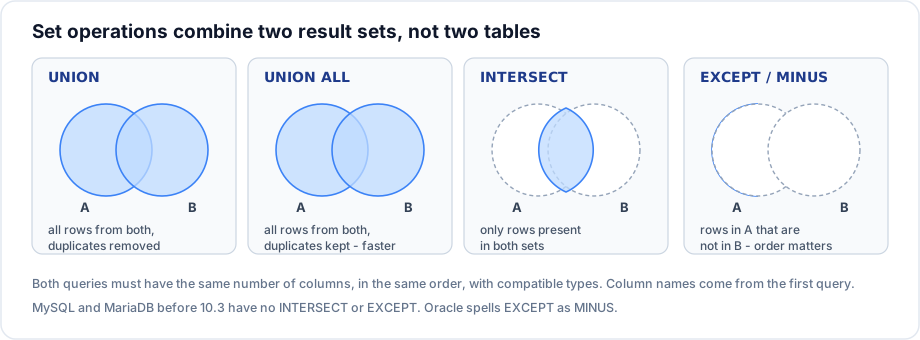
Syntax
SELECT col1, col2 FROM table_a
UNION [ALL]
SELECT col1, col2 FROM table_b
ORDER BY col1;          -- applies to the combined result, always last
Example
-- One contact list from two sources, labelled
SELECT name, city, 'customer' AS source FROM customers
UNION ALL
SELECT CONCAT(first_name, ' ', last_name), NULL, 'employee' FROM employees
ORDER BY source, name;
-- Every location that appears in either table, listed once
SELECT location FROM departments WHERE location IS NOT NULL
UNION
SELECT city FROM customers
ORDER BY location;Explanation
The second query uses UNION because Pune and Mumbai appear in both tables and should be listed once. The first uses UNION ALL because every row is a distinct person and de duplication would be wasted work - and could silently merge two people with the same name.
Note the column alignment. The employee query supplies NULL for city, because both halves must have the same number of columns in the same order. The result column names come from the first query, which is why ORDER BY location works even though the second query calls that column city.
Column compatibility rules
| Rule | Detail |
|---|---|
| Same column count | Both queries must select the same number of columns |
| Compatible types | Position 1 in both must be comparable - text with text, number with number |
| Position, not name | Columns are matched by position; names are ignored |
| Result names | Taken from the first query |
| ORDER BY | Only once, at the very end, using first query column names |
UNION vs UNION ALL
-- UNION does a distinct pass over the combined result: sort or hash, then de duplicate
SELECT customer_id FROM orders WHERE status = 'shipped'
UNION
SELECT customer_id FROM orders WHERE total > 10000;

-- UNION ALL just concatenates. No comparison work at all.
SELECT customer_id FROM orders WHERE status = 'shipped'
UNION ALL
SELECT customer_id FROM orders WHERE total > 10000;
If you know the two sets cannot overlap - or duplicates are wanted - UNION ALL is strictly cheaper. On large results the difference is substantial, because UNION has to materialise and de duplicate everything.
Important rules
UNIONremoves duplicate rows across the whole row, not per column.UNIONtreats twoNULLs as duplicates of each other, even thoughNULL = NULLis unknown.ORDER BYappears once, at the end. Putting it in the first query is an error in most dialects.LIMITat the end applies to the combined result; to limit one branch, wrap that branch in a derived table.- Set operations are the standard way to emulate
FULL OUTER JOINin MySQL.
Common mistakes
- Using
UNIONwhenUNION ALLwas meant, and paying for a de duplication pass that removes nothing. - Mismatched column order - the query runs, and city values end up in the name column.
- Trying to
ORDER BYa column name that only exists in the second query. - Using
UNIONto combine tables that should have been joined. Different columns means join; more rows of the same shape means union.
Best practices
- Default to
UNION ALL, and switch toUNIONonly when duplicates are genuinely possible and unwanted. - Alias the columns explicitly in the first query so the result names are deliberate.
- Add a literal source column when combining different tables - it makes the result self documenting.
- Keep both branches formatted identically so a column mismatch is visible on sight.
Practice
- Build one list of every city that appears in
customersordepartments, without duplicates. - Produce a combined activity feed of orders and employee hire dates, each row labelled with its type.
- Explain when
UNIONandUNION ALLreturn identical results, and which you should write in that case.