IN, BETWEEN, LIKE and IS NULL
The four filtering shortcuts you will use constantly: set membership, ranges, pattern matching with wildcards, and the only correct way to test for NULL.
- SQL Basics
- DDL
- DML
- SELECT
- WHERE
- Functions
- NULL and Logic
- Aggregate Functions
- GROUP BY
- JOIN
- Subqueries
- Set Operations
- CTEs
- Constraints
- Keys
- Relationships
- Database Design
- Normalisation
- Views
- Window Functions
- Advanced SQL
- Procedures and Functions
- Triggers
- Temporary Tables
- Transactions
- Isolation and Locking
- Indexes
- Query Performance
- SQL Security
- SQL Dialects
- Practical SQL
Concept
These four predicates exist because the long forms are tedious. Each has one rule that surprises people, and all four are worth learning together.
IN and NOT IN
SELECT first_name, dept_id
FROM   employees
WHERE  dept_id IN (10, 30);

-- Equivalent to
WHERE  dept_id = 10 OR dept_id = 30;

-- IN also accepts a subquery
SELECT name FROM departments
WHERE  id IN (SELECT dept_id FROM employees WHERE salary > 90000);
The NOT IN trap. If the list or subquery contains a singleNULL,NOT INreturns no rows at all.x NOT IN (1, NULL)meansx <> 1 AND x <> NULL, and the second half is alwaysUNKNOWN. UseNOT EXISTS, or addWHERE col IS NOT NULLinside the subquery.
BETWEEN
SELECT first_name, salary
FROM   employees
WHERE  salary BETWEEN 60000 AND 90000;    -- inclusive of both ends

-- Identical to
WHERE  salary >= 60000 AND salary <= 90000;
BETWEEN is always inclusive, and the lower bound must come first - BETWEEN 90000 AND 60000 matches nothing. For dates and timestamps, prefer the half open form:
-- Correct for DATE and DATETIME alike
WHERE  order_date >= '2024-01-01' AND order_date < '2024-02-01';
LIKE
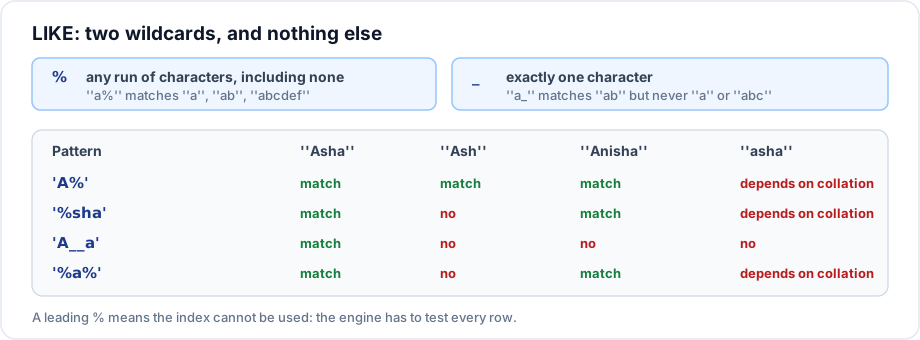
SELECT name FROM customers WHERE name LIKE 'S%';        -- starts with S
SELECT name FROM customers WHERE name LIKE '%Ltd';      -- ends with Ltd
SELECT name FROM customers WHERE name LIKE '%systems%'; -- contains
SELECT email FROM employees WHERE email LIKE '_____@example.com'; -- 5 chars then the domain

-- Matching a literal % or _ needs an escape character
SELECT * FROM products WHERE name LIKE '%50\%%';               -- MySQL default escape
SELECT * FROM products WHERE name LIKE '%50!%%' ESCAPE '!';   -- standard, portable
IS NULL and IS NOT NULL
SELECT first_name FROM employees WHERE dept_id IS NULL;
SELECT first_name FROM employees WHERE dept_id IS NOT NULL;

-- These never work:
WHERE dept_id =  NULL     -- always UNKNOWN, returns nothing
WHERE dept_id <> NULL     -- always UNKNOWN, returns nothing
Important rules
INwith aNULLin the list is harmless.NOT INwith aNULLin the list returns nothing.BETWEENincludes both endpoints.LIKE '%text'- a leading wildcard - cannot use a normal B-tree index. Full text search or a reversed column index is the answer at scale.LIKEcase sensitivity follows the collation. PostgreSQL is case sensitive and offersILIKE; MySQL is usually case insensitive by default.IS NULLis the only test for NULL. There is no exception.
Common mistakes
NOT IN (SELECT dept_id FROM employees)returning nothing because one employee has aNULLdepartment. This is the single most common NULL bug in real systems.- Using
BETWEENon aDATETIMEand losing the last day's rows. - Building a search feature entirely from
LIKE '%term%'and watching it slow down as the table grows. - Writing
= NULLand concluding the data is missing.
Best practices
- Prefer
NOT EXISTSoverNOT INwhenever a subquery is involved - it is NULL safe and usually optimises better. - Use half open ranges for anything with a time component.
- Anchor
LIKEpatterns on the left ('abc%') so an index can still be used. - For real search, use the database's full text index rather than wildcards on both sides.
Practice
- Find every customer whose country is India or Singapore, using
IN. - Show why
SELECT * FROM departments WHERE id NOT IN (SELECT dept_id FROM employees)returns nothing on the sample data, then fix it two different ways. - Write a pattern that matches product names containing the word "Licence" anywhere, and explain its index cost.