OVER, PARTITION BY and Window ORDER BY
Window functions compute across related rows without collapsing them. Learn the OVER clause, PARTITION BY, window ORDER BY, and how they differ from GROUP BY.
- SQL Basics
- DDL
- DML
- SELECT
- WHERE
- Functions
- NULL and Logic
- Aggregate Functions
- GROUP BY
- JOIN
- Subqueries
- Set Operations
- CTEs
- Constraints
- Keys
- Relationships
- Database Design
- Normalisation
- Views
- Window Functions
- Advanced SQL
- Procedures and Functions
- Triggers
- Temporary Tables
- Transactions
- Isolation and Locking
- Indexes
- Query Performance
- SQL Security
- SQL Dialects
- Practical SQL
Concept
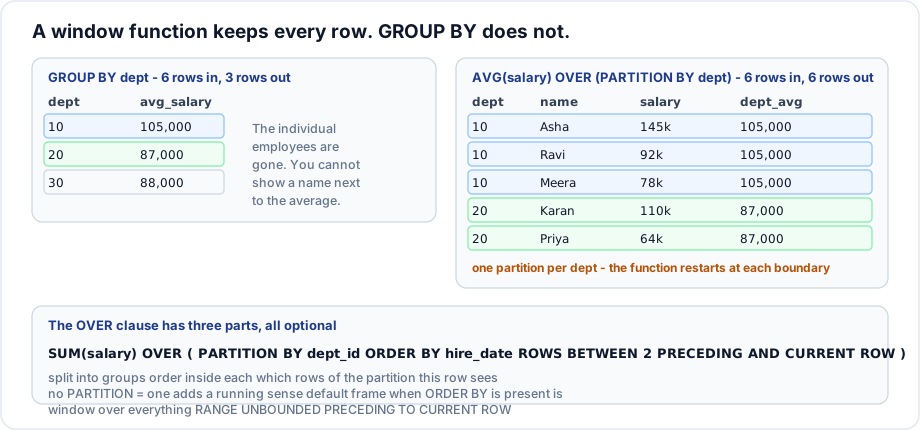
A window function performs a calculation across a set of rows related to the current row, and returns a value for every row. Unlike GROUP BY, it does not collapse anything - the detail rows survive and gain an extra column.
Syntax
function_name(arguments) OVER (
    [PARTITION BY column_list]     -- split the rows into independent windows
    [ORDER BY column_list]         -- order inside each window
    [frame_clause]                 -- which rows of the window this row sees
)
Example
SELECT first_name,
       dept_id,
       salary,
       ROUND(AVG(salary) OVER (PARTITION BY dept_id), 2)  AS dept_avg,
       ROUND(salary - AVG(salary) OVER (PARTITION BY dept_id), 2) AS diff_from_avg,
       COUNT(*)   OVER (PARTITION BY dept_id)             AS dept_size,
       MAX(salary) OVER (PARTITION BY dept_id)            AS dept_top,
       ROUND(AVG(salary) OVER (), 2)                      AS company_avg
FROM   employees
ORDER BY dept_id, salary DESC;
Explanation
Every employee row is preserved, and five computed columns are attached to it. That is the thing GROUP BY cannot do: showing an individual salary and the group average on the same line would otherwise need a self join or a correlated subquery.
OVER (PARTITION BY dept_id)- the window is that employee's department. The function restarts at each department boundary.OVER ()- an empty window is the entire result set, socompany_avgis the same on every row.
PARTITION BY is not GROUP BY. It divides rows into windows for the calculation, but it does not reduce the number of output rows.
Window ORDER BY changes the meaning
-- Without ORDER BY: the whole partition, so this is the department total
SELECT first_name, dept_id, hire_date, salary,
       SUM(salary) OVER (PARTITION BY dept_id) AS dept_total
FROM   employees ORDER BY dept_id, hire_date;

-- With ORDER BY: a running total, because the default frame becomes
-- "from the start of the partition up to the current row"
SELECT first_name, dept_id, hire_date, salary,
       SUM(salary) OVER (PARTITION BY dept_id ORDER BY hire_date) AS running_total
FROM   employees ORDER BY dept_id, hire_date;
Adding ORDER BY inside OVER silently changes the default frame from the whole partition to everything up to and including this row. That single rule explains most confusion about window functions.
Where window functions may appear
-- Legal: SELECT list and ORDER BY
SELECT first_name, ROW_NUMBER() OVER (ORDER BY salary DESC) AS rn FROM employees;

-- Illegal: WHERE, GROUP BY and HAVING all run BEFORE window functions
SELECT first_name FROM employees
WHERE  ROW_NUMBER() OVER (ORDER BY salary DESC) <= 3;

-- The fix: compute in a subquery or CTE, filter outside it
WITH ranked AS (
    SELECT first_name, salary,
           ROW_NUMBER() OVER (ORDER BY salary DESC) AS rn
    FROM   employees
)
SELECT first_name, salary FROM ranked WHERE rn <= 3;
Important rules
- Window functions run after
WHERE,GROUP BYandHAVING, and beforeORDER BY. They can only appear inSELECTandORDER BY. - To filter on a window result, wrap the query in a CTE or derived table.
OVER ()with nothing inside means one window covering every row.- Adding
ORDER BYinsideOVERchanges the default frame and therefore the answer. - Window functions and
GROUP BYcan be combined - the window then operates on the grouped rows. - Support: MySQL 8.0+, MariaDB 10.2+, PostgreSQL, SQL Server 2012+, Oracle, SQLite 3.25+. Not MySQL 5.7.
Common mistakes
- Putting a window function in
WHEREand getting a syntax error. - Expecting
PARTITION BYto reduce the row count. - Adding
ORDER BYinsideOVERfor tidiness and accidentally turning a total into a running total. - Repeating the same long
OVERclause five times instead of naming it withWINDOW.
Best practices
- Name a repeated window once with the
WINDOWclause:... WINDOW w AS (PARTITION BY dept_id ORDER BY hire_date)then writeSUM(salary) OVER w. - Compute window values in a CTE and filter in the outer query.
- Be explicit about the frame whenever
ORDER BYis present and you want the whole partition. - Index the partition and order columns; the engine can then often avoid a sort.
Practice
- Show each order with its total and the average order total for that customer.
- Show each employee's salary as a percentage of their department's payroll.
- Explain why
SUM(salary) OVER (PARTITION BY dept_id ORDER BY salary)does not give the department total.