INNER JOIN Explained
INNER JOIN keeps only rows that match on both sides. Learn the syntax, how the join condition works, and why unmatched rows silently disappear.
- SQL Basics
- DDL
- DML
- SELECT
- WHERE
- Functions
- NULL and Logic
- Aggregate Functions
- GROUP BY
- JOIN
- Subqueries
- Set Operations
- CTEs
- Constraints
- Keys
- Relationships
- Database Design
- Normalisation
- Views
- Window Functions
- Advanced SQL
- Procedures and Functions
- Triggers
- Temporary Tables
- Transactions
- Isolation and Locking
- Indexes
- Query Performance
- SQL Security
- SQL Dialects
- Practical SQL
Concept
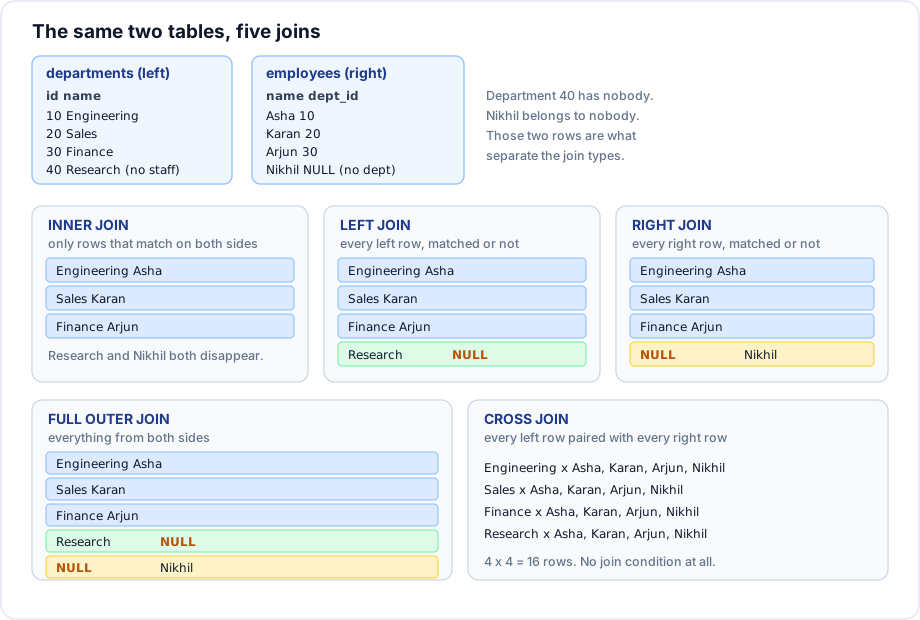
A join combines rows from two tables using a related column. INNER JOIN is the strictest form: a row appears in the result only when it has a match on both sides.
Syntax
SELECT columns
FROM   left_table  l
INNER JOIN right_table r
        ON r.foreign_key = l.primary_key;
INNER is optional - a bare JOIN means INNER JOIN in every dialect - but writing it makes the intent explicit.
Example
SELECT e.first_name,
       e.last_name,
       e.salary,
       d.name     AS department,
       d.location
FROM   employees e
INNER JOIN departments d
        ON d.id = e.dept_id
ORDER BY d.name, e.salary DESC;
Explanation
On the sample data this returns 7 rows, not 8. Nikhil has dept_id = NULL, and NULL = 10 is UNKNOWN, never true, so he matches nothing and is dropped. Department 40 (Research) is also missing, because no employee points at it.
That is the defining behaviour of an inner join, and it is the most common source of quietly wrong reports: an inner join can lose rows you did not intend to lose. If a headcount report shows 7 when the company has 8 employees, this is why.
Joining more than two tables
SELECT c.name        AS customer,
       o.id          AS order_id,
       o.order_date,
       p.name        AS product,
       oi.quantity,
       oi.unit_price
FROM   orders o
INNER JOIN customers   c  ON c.id = o.customer_id
INNER JOIN order_items oi ON oi.order_id = o.id
INNER JOIN products    p  ON p.id = oi.product_id
WHERE  o.status = 'shipped'
ORDER BY o.order_date, p.name;
The old comma syntax
-- Legacy: join condition hidden in the WHERE clause
SELECT e.first_name, d.name
FROM   employees e, departments d
WHERE  d.id = e.dept_id;

-- Modern: condition lives with the join it belongs to
SELECT e.first_name, d.name
FROM   employees e
JOIN   departments d ON d.id = e.dept_id;
Both produce the same result. The modern form is strongly preferred: forgetting a condition in the comma form silently produces a Cartesian product, while forgetting an ON clause is a syntax error the database catches for you.
Important rules
- Only matching rows survive; unmatched rows on either side are dropped.
NULLnever matches anything, including anotherNULL.- The
ONcondition does not have to be equality, and does not have to use a key - but joining on non key columns usually indicates a design problem. - Join order does not change the result of inner joins; the optimiser reorders them freely.
- Every table needs its own
ONclause. Joining n tables needs n - 1 join conditions.
Common mistakes
- Using
INNER JOINwhen the report must show every row of one side - useLEFT JOIN. - Forgetting a join condition and producing a Cartesian product that looks like duplicated data.
- Writing
ON e.dept_id = d.idin one query andON d.id = e.dept_idin the next - both work, but pick one direction and stay consistent. - Not qualifying columns, so
nameis ambiguous when both tables have one.
Best practices
- Give every table a short alias and qualify every column with it.
- Write the
ONclause immediately after eachJOIN, never inWHERE. - Join on indexed key columns; a foreign key column without an index makes joins slow.
- Sanity check the row count. If a join changes the number of rows unexpectedly, the join is the bug.
Practice
- List every employee with their department name and location.
- List every order with the customer name and the number of line items.
- Explain why the first query returns 7 rows on the sample data, not 8.