Subquery Basics: Scalar and Single Row Subqueries
A query inside a query. Learn where a subquery may appear, what each position requires it to return, and the error a scalar subquery raises when it returns two rows.
- SQL Basics
- DDL
- DML
- SELECT
- WHERE
- Functions
- NULL and Logic
- Aggregate Functions
- GROUP BY
- JOIN
- Subqueries
- Set Operations
- CTEs
- Constraints
- Keys
- Relationships
- Database Design
- Normalisation
- Views
- Window Functions
- Advanced SQL
- Procedures and Functions
- Triggers
- Temporary Tables
- Transactions
- Isolation and Locking
- Indexes
- Query Performance
- SQL Security
- SQL Dialects
- Practical SQL
Concept
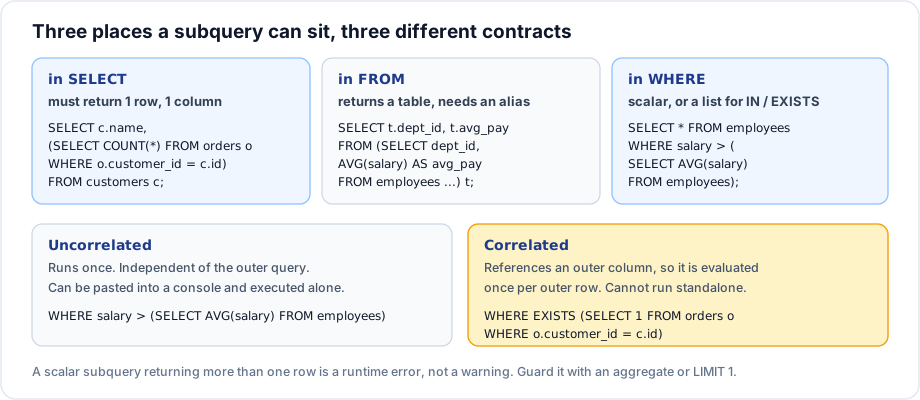
A subquery is a SELECT nested inside another statement. The inner query runs first (conceptually), and its result feeds the outer one. What the subquery is allowed to return depends entirely on where it sits.
Syntax
-- Scalar subquery: exactly one row, exactly one column
SELECT columns
FROM   table_name
WHERE  column operator (SELECT single_value FROM other_table WHERE condition);
Example
-- Everyone paid above the company average
SELECT first_name, last_name, salary
FROM   employees
WHERE  salary > (SELECT AVG(salary) FROM employees)
ORDER BY salary DESC;
-- A scalar subquery in the select list, once per row
SELECT first_name,
salary,
(SELECT ROUND(AVG(salary), 2) FROM employees) AS company_average,
ROUND(salary - (SELECT AVG(salary) FROM employees), 2) AS difference
FROM employees
ORDER BY difference DESC;Explanation
The first query cannot be written without a subquery. WHERE salary > AVG(salary) is illegal, because WHERE runs before aggregation - the average does not exist yet. The subquery computes it in a separate, complete query first.
Both subqueries above are uncorrelated: they mention no column from the outer query, so they can be copied into a console and run on their own, and the engine evaluates them once.
When a scalar subquery returns two rows
-- Fails: the subquery returns one row per department
SELECT first_name FROM employees
WHERE  dept_id = (SELECT id FROM departments WHERE location IN ('Pune', 'Mumbai'));

-- Fix 1: use IN, which accepts many rows
SELECT first_name FROM employees
WHERE  dept_id IN (SELECT id FROM departments WHERE location IN ('Pune', 'Mumbai'));

-- Fix 2: force a single row when that is genuinely what you want
SELECT first_name FROM employees
WHERE  dept_id = (SELECT id FROM departments WHERE location = 'Pune' LIMIT 1);
MySQL reports Subquery returns more than 1 row; other products word it differently. It is a runtime error, so a query that works on test data can fail in production the day a second matching row appears - which is a strong argument for IN or an aggregate over LIMIT 1.
Important rules
- A subquery in a comparison must return one row and one column.
- A subquery in the select list must be scalar, and is evaluated for every output row.
- A subquery must be wrapped in parentheses.
- A scalar subquery returning no rows yields
NULL, which makes the comparisonUNKNOWNand the row disappear - a silent failure, unlike the too many rows case. ORDER BYinside a subquery is pointless unless it is paired withLIMIT.
Common mistakes
- Using
=where the subquery can return several rows. - Forgetting that an empty subquery result gives
NULL, not zero rows. - Repeating an expensive subquery several times in one select list instead of computing it once in a CTE.
- Putting
ORDER BYin a subquery and expecting the outer result to be sorted.
Best practices
- Run the subquery on its own first; if it does not work alone, it is correlated and needs different thinking.
- Use
INor an aggregate rather thanLIMIT 1to force a scalar -LIMIT 1hides ambiguity. - Lift a repeated subquery into a CTE and reference it by name.
- Indent the subquery so its extent is obvious at a glance.
Practice
- Find every order whose total exceeds the average order total.
- Show each employee's salary alongside their department's average salary.
- Explain what
WHERE dept_id = (SELECT id FROM departments WHERE name = 'Marketing')returns when no such department exists.