One to One and One to Many Relationships
The two simplest relationships and the single rule that decides where the foreign key goes - plus when a one to one split is actually worth it.
- SQL Basics
- DDL
- DML
- SELECT
- WHERE
- Functions
- NULL and Logic
- Aggregate Functions
- GROUP BY
- JOIN
- Subqueries
- Set Operations
- CTEs
- Constraints
- Keys
- Relationships
- Database Design
- Normalisation
- Views
- Window Functions
- Advanced SQL
- Procedures and Functions
- Triggers
- Temporary Tables
- Transactions
- Isolation and Locking
- Indexes
- Query Performance
- SQL Security
- SQL Dialects
- Practical SQL
Concept
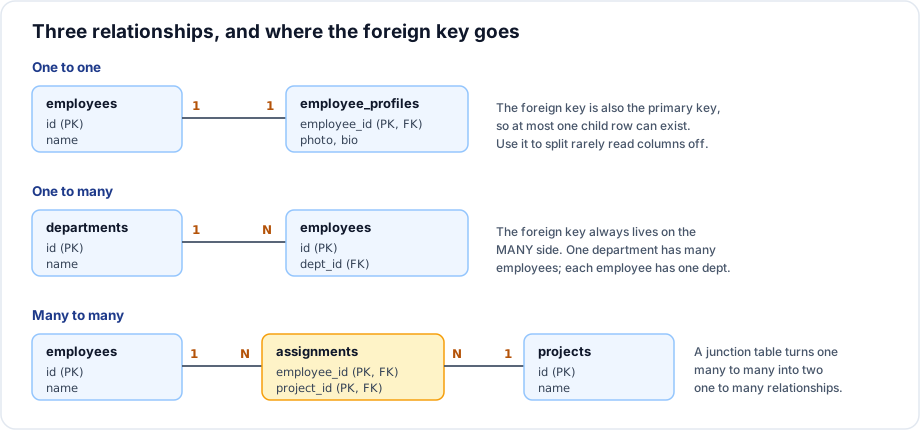
A relationship is a link between two tables, implemented with a foreign key. Its cardinality - one to one, one to many or many to many - decides where that key lives.
One to many
The common case. One department has many employees; each employee belongs to one department.
The rule: the foreign key always lives on the many side.
CREATE TABLE departments (
    id   INT PRIMARY KEY,
    name VARCHAR(60) NOT NULL
);

CREATE TABLE employees (
    id      INT PRIMARY KEY,
    name    VARCHAR(60) NOT NULL,
    dept_id INT NULL,                       -- the foreign key, on the many side
    CONSTRAINT fk_emp_dept FOREIGN KEY (dept_id) REFERENCES departments(id)
);

CREATE INDEX idx_employees_dept ON employees (dept_id);   -- always index it
Putting the key on the wrong side is impossible to do correctly: departments would need a column per employee, which is the repeating group that first normal form forbids.
Whether the column is nullable expresses whether the relationship is optional:
| Declaration | Means |
|---|---|
dept_id INT NULL | An employee may have no department |
dept_id INT NOT NULL | Every employee must belong to a department |
One to one
Each row on one side matches at most one row on the other. It is implemented as a one to many whose "many" side is capped at one, either by making the foreign key the primary key or by adding a UNIQUE constraint.
CREATE TABLE employee_profiles (
    employee_id INT PRIMARY KEY,            -- PK and FK at once: at most one row
    photo_path  VARCHAR(255),
    bio         TEXT,
    CONSTRAINT fk_profile_emp FOREIGN KEY (employee_id)
        REFERENCES employees(id) ON DELETE CASCADE
);
When is a one to one split worth it?
- Rarely read columns. A large
bioor photo blob read on one screen in fifty makes every other query's rows bigger. - Different access control. Salary or medical data in a separate table can be granted separately.
- Optional data. If only 5 percent of rows have the columns, a child table avoids 95 percent nulls.
- Different write patterns. A frequently updated counter column separated from a mostly static row reduces contention.
Otherwise, keep the columns in the same table. A one to one split adds a join to every query that needs both halves and buys nothing.
Querying across a relationship
-- One to many: parent details on child rows
SELECT e.first_name, d.name AS department
FROM   employees e
LEFT JOIN departments d ON d.id = e.dept_id;

-- One to many: aggregate the children per parent
SELECT d.name, COUNT(e.id) AS headcount
FROM   departments d
LEFT JOIN employees e ON e.dept_id = d.id
GROUP BY d.name;
Important rules
- The foreign key goes on the many side. There is no exception.
- Nullability of the foreign key expresses whether the relationship is optional.
- A one to one needs the foreign key to be the primary key or to carry a
UNIQUEconstraint - otherwise it is a one to many. - Index every foreign key column. MySQL does it automatically; PostgreSQL, SQL Server and Oracle do not.
- Joining from parent to child multiplies parent rows. Aggregate before joining when you need one row per parent.
Common mistakes
- Storing a comma separated list of child ids in the parent instead of creating a child table.
- Splitting a table one to one for tidiness, and paying a join on every query.
- Forgetting the
UNIQUEon a one to one, so a second child row can appear. - Leaving the foreign key nullable when the business requires a parent.
- Leaving a foreign key unindexed outside MySQL.
Best practices
- Model the relationship from a sentence: one X has many Y; each Y has one X. The key goes on Y.
- Use
ON DELETE CASCADEfor a one to one extension table - the profile has no meaning without the employee. - Name foreign key columns
<parent_singular>_id:dept_id,customer_id,order_id. - Keep a one to one in the same table unless one of the four reasons above applies.
Practice
- Model a customer places many orders. Which table gets the foreign key, and should it be nullable?
- Design a one to one extension table for storing a rarely read shipping note against an order.
- Why can a one to many not be implemented by adding columns to the "one" side?