What Indexes Are and Why They Exist
An index is a sorted lookup structure the database maintains for you. Learn how a B-tree finds a row, what an index costs, and the clustered index in InnoDB.
- SQL Basics
- DDL
- DML
- SELECT
- WHERE
- Functions
- NULL and Logic
- Aggregate Functions
- GROUP BY
- JOIN
- Subqueries
- Set Operations
- CTEs
- Constraints
- Keys
- Relationships
- Database Design
- Normalisation
- Views
- Window Functions
- Advanced SQL
- Procedures and Functions
- Triggers
- Temporary Tables
- Transactions
- Isolation and Locking
- Indexes
- Query Performance
- SQL Security
- SQL Dialects
- Practical SQL
Concept
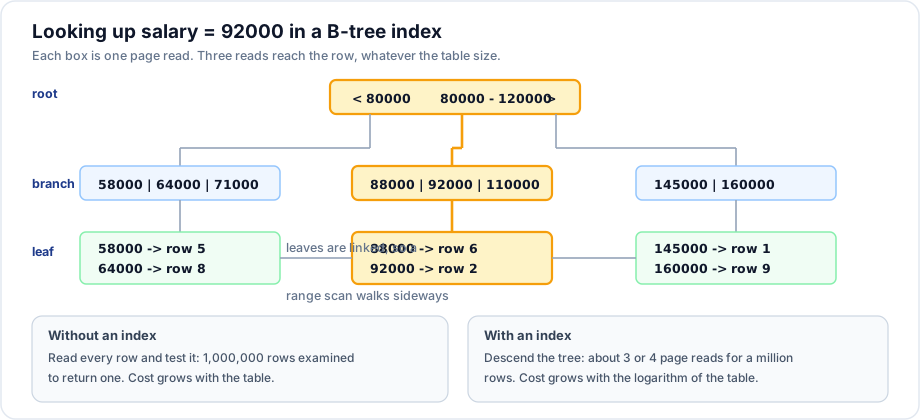
An index is a separate, sorted data structure that lets the database find rows without reading the whole table. The analogy is exact: the index at the back of a book takes space and must be updated when the book changes, and it turns "read every page" into "look it up".
Syntax
CREATE INDEX idx_name ON table_name (column_name);
CREATE INDEX idx_name ON table_name (col_a, col_b);
CREATE UNIQUE INDEX uq_name ON table_name (column_name);

DROP INDEX idx_name ON table_name;      -- MySQL
DROP INDEX idx_name;                    -- PostgreSQL, SQL Server

SHOW INDEX FROM table_name;             -- MySQL
SELECT * FROM pg_indexes WHERE tablename = 'orders';   -- PostgreSQL
Example
-- Before: this scans every order
SELECT id, order_date, total FROM orders WHERE customer_id = 1;

EXPLAIN SELECT id, order_date, total FROM orders WHERE customer_id = 1;
-- type: ALL, rows: (the whole table)

CREATE INDEX idx_orders_customer ON orders (customer_id);

EXPLAIN SELECT id, order_date, total FROM orders WHERE customer_id = 1;
-- type: ref, key: idx_orders_customer, rows: (only the matches)
Explanation
The index stores customer_id values in sorted order, each with a pointer back to the row. Finding customer_id = 1 becomes a descent through a tree of a few levels rather than a comparison against every row. The cost goes from proportional to the table size to proportional to its logarithm - which is why an index that saves nothing on 100 rows is transformative on 100 million.
What indexes cost
| Cost | Detail |
|---|---|
| Disk space | Each index is a copy of its columns plus a row pointer |
| Write speed | Every INSERT, UPDATE and DELETE must update every affected index |
| Memory | Indexes compete for the buffer pool with the data |
| Planning | More indexes means more choices for the optimiser to evaluate |
A table with ten indexes writes far more slowly than the same table with three. This is the whole trade: indexes make reads faster and writes slower.
The clustered index
In InnoDB the primary key is the clustered index: the table's rows are physically stored inside it, in primary key order. Two consequences follow, and both matter:
- A lookup by primary key reaches the row in one descent - there is nothing further to fetch.
- Every secondary index stores the primary key as its pointer. A secondary index lookup finds the primary key, then descends the clustered index again to reach the row. That second step is the bookmark lookup.
-- Reaches the row directly through the clustered index
SELECT * FROM employees WHERE id = 2;

-- Two steps: idx_employees_email finds the id, then the clustered index finds the row
SELECT * FROM employees WHERE email = 'ravi@example.com';

-- One step: everything needed is in the index itself (a covering index)
SELECT email FROM employees WHERE email = 'ravi@example.com';
A wide primary key is therefore expensive twice over: it makes the clustered index big, and it makes every secondary index big too. This is the concrete reason the keys note recommends a narrow surrogate key.
Index types
| Type | Good for | Available in |
|---|---|---|
| B-tree | Equality, ranges, sorting, prefix matches. The default. | All products |
| Hash | Equality only - no ranges, no ordering | PostgreSQL, MySQL MEMORY tables |
| Full text | Word search inside text | MySQL, PostgreSQL, SQL Server |
| Spatial | Geometry and location queries | MySQL, PostgreSQL (PostGIS) |
| Partial / filtered | Indexing only the rows that matter | PostgreSQL, SQL Server - not MySQL |
Important rules
- A primary key and a unique constraint each create an index automatically.
- MySQL indexes foreign key columns automatically; PostgreSQL, SQL Server and Oracle do not.
- An index on a column is useless if the query wraps that column in a function.
- Indexes do not help when the query returns most of the table - a scan is genuinely cheaper then.
- Adding an index locks or rebuilds the table in older versions; modern MySQL does most index builds online.
Common mistakes
- Indexing every column "just in case", and halving write throughput.
- Forgetting to index foreign keys outside MySQL, making joins and parent deletes slow.
- Creating an index that duplicates the leading columns of an existing one.
- Expecting an index to help
WHERE UPPER(name) = 'ASHA'. - Measuring on 100 rows, where a scan wins, and concluding the index is useless.
Best practices
- Index the columns used in
WHERE,JOIN,ORDER BYandGROUP BY- in that priority order. - Keep the primary key narrow, especially in InnoDB.
- Measure with
EXPLAINbefore and after; do not guess. - Review unused indexes periodically and drop them - MySQL 8's
sys.schema_unused_indexeslists candidates. - Load large tables first and create the indexes afterwards; it is much faster than maintaining them per row.
Practice
- Run
EXPLAINon a filter over an unindexed column, add the index, and compare. - Explain why
SELECT email FROM employees WHERE email = ...can be faster thanSELECT *with the same filter. - List the indexes the sample schema already has, and say which ones exist because of a constraint.