What is SQL: Databases, DBMS and RDBMS
SQL is the declarative language used to define and query relational data. Start here to see what a database, a DBMS and an RDBMS actually are.
- SQL Basics
- DDL
- DML
- SELECT
- WHERE
- Functions
- NULL and Logic
- Aggregate Functions
- GROUP BY
- JOIN
- Subqueries
- Set Operations
- CTEs
- Constraints
- Keys
- Relationships
- Database Design
- Normalisation
- Views
- Window Functions
- Advanced SQL
- Procedures and Functions
- Triggers
- Temporary Tables
- Transactions
- Isolation and Locking
- Indexes
- Query Performance
- SQL Security
- SQL Dialects
- Practical SQL
Concept
SQL (Structured Query Language) is the standard language for working with data held in a relational database. It is declarative: you describe the result you want, and the database decides how to produce it. You never write loops that walk through rows one at a time.
Three words are used loosely in conversation and mean different things:
| Term | Meaning | Example |
|---|---|---|
| Database | The organised collection of data itself | The company database |
| DBMS | The software that stores and manages databases | Any database engine, including non relational ones |
| RDBMS | A DBMS built on the relational model, driven by SQL | MySQL, PostgreSQL, SQL Server, Oracle, SQLite |
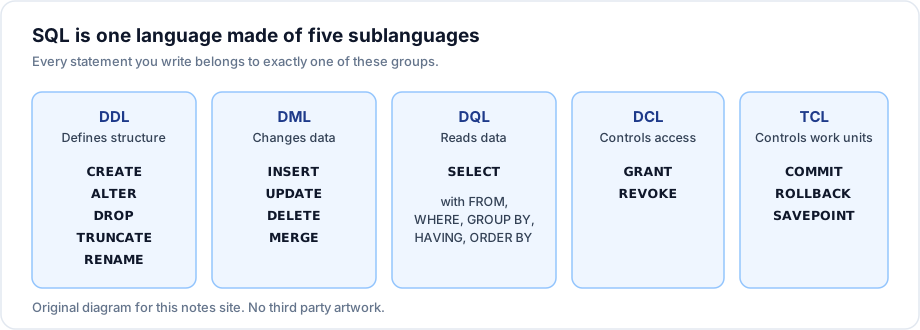
The five sublanguages
Every SQL statement belongs to one of five groups. Knowing which group a statement belongs to tells you whether it can be rolled back, whether it locks objects and which privilege it needs.
Syntax
One statement from each group, so the shape of the language is visible from the start:
-- DDL: define a table
CREATE TABLE departments (
    id       INT PRIMARY KEY,
    name     VARCHAR(60) NOT NULL,
    location VARCHAR(60)
);

-- DML: put data in it
INSERT INTO departments (id, name, location)
VALUES (10, 'Engineering', 'Bengaluru');

-- DQL: read it back
SELECT id, name FROM departments WHERE location = 'Bengaluru';

-- DCL: control who may read it
GRANT SELECT ON departments TO reporting_user;

-- TCL: make a group of changes permanent
COMMIT;
Example
A single declarative question, answered without a single loop:
SELECT d.name AS department, COUNT(e.id) AS headcount
FROM   departments d
LEFT JOIN employees e ON e.dept_id = d.id
GROUP BY d.name
ORDER BY headcount DESC;
Explanation
You did not say read every department, then scan the employee table for each one, then count. You said which tables are involved, how they relate, what to group by and how to sort. The query optimiser chooses the access method, the join algorithm and the order of work. That separation is why the same SQL can run on a table of ten rows and a table of ten million rows.
Important rules
- SQL is a standard (ISO/IEC 9075), but every product implements a dialect. The core -
SELECT,JOIN,GROUP BY, constraints - is portable. Date functions, string functions, auto increment and paging are not. - A relational table is a set of rows. There is no row order unless you write
ORDER BY. - SQL is case insensitive for keywords. Whether identifiers are case sensitive depends on the product and the operating system.
- DDL is auto committing in MySQL and Oracle: you cannot roll a
CREATE TABLEback. In PostgreSQL and SQL Server you usually can.
Common mistakes
- Treating a table like a spreadsheet and relying on the order rows were inserted in.
- Assuming an example found for one product runs unchanged on another. Always check which dialect an example targets.
- Confusing SQL the language with MySQL the product. MySQL is one implementation of SQL.
Best practices
- Write keywords in upper case and identifiers in lower case. It makes long statements readable at a glance.
- Name the dialect you are targeting in team documentation, then stay in it.
- Prefer standard SQL when a standard form exists, and reach for vendor extensions deliberately.
Practice
- Classify each of these as DDL, DML, DQL, DCL or TCL:
TRUNCATE TABLE orders,ROLLBACK,REVOKE INSERT ON orders FROM temp_user,UPDATE orders SET status = 'shipped'. - Explain in one sentence why an RDBMS is free to change how it executes your query without changing the result.
- Name one thing that is identical in every SQL product and one thing that differs in every SQL product.