GROUP BY Fundamentals
GROUP BY collapses rows into one row per distinct key. Learn the single rule that governs the select list and how NULLs are grouped.
- SQL Basics
- DDL
- DML
- SELECT
- WHERE
- Functions
- NULL and Logic
- Aggregate Functions
- GROUP BY
- JOIN
- Subqueries
- Set Operations
- CTEs
- Constraints
- Keys
- Relationships
- Database Design
- Normalisation
- Views
- Window Functions
- Advanced SQL
- Procedures and Functions
- Triggers
- Temporary Tables
- Transactions
- Isolation and Locking
- Indexes
- Query Performance
- SQL Security
- SQL Dialects
- Practical SQL
Concept
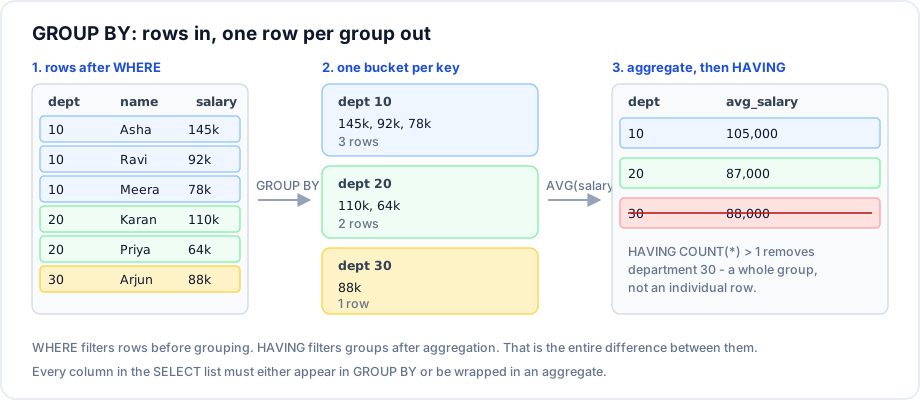
GROUP BY divides the rows that survived WHERE into buckets - one per distinct value of the grouping columns - and returns exactly one row per bucket. Aggregate functions then summarise each bucket.
Syntax
SELECT   grouping_column, aggregate_function(other_column)
FROM     table_name
WHERE    row_condition
GROUP BY grouping_column
ORDER BY grouping_column;
Example
SELECT dept_id,
       COUNT(*)              AS headcount,
       ROUND(AVG(salary), 2) AS avg_salary,
       MAX(salary)           AS top_salary,
       SUM(salary)           AS payroll
FROM   employees
WHERE  status = 'active'
GROUP BY dept_id
ORDER BY payroll DESC;
Explanation
Read that query in evaluation order, not in written order:
FROM employees- start with all 8 rows.WHERE status = 'active'- drop the inactive employee. 7 rows remain.GROUP BY dept_id- form one bucket per department, plus one bucket for theNULLdepartment.- Aggregates run per bucket.
ORDER BYsorts the resulting rows.
The one rule
Every column in theSELECTlist must either appear in theGROUP BYclause or be wrapped in an aggregate function.
-- Invalid: which of the three names in department 10 should first_name return?
SELECT dept_id, first_name, COUNT(*)
FROM   employees
GROUP BY dept_id;

-- Valid: the name is aggregated
SELECT dept_id, MAX(first_name) AS a_name, COUNT(*) AS headcount
FROM   employees
GROUP BY dept_id;

-- Valid: the name is part of the group key
SELECT dept_id, first_name, COUNT(*) AS rows_per_person
FROM   employees
GROUP BY dept_id, first_name;
PostgreSQL, SQL Server and Oracle reject the first query outright. MySQL and MariaDB reject it too when ONLY_FULL_GROUP_BY is enabled - which is the default in MySQL 8 - and otherwise return an arbitrary value from the group, which is worse than an error because it looks like it worked.
Important rules
- All
NULLs in a grouping column form one single group. WHEREruns before grouping, so it cannot reference an aggregate.- The result has one row per distinct combination of grouping columns - no more, no fewer.
- Grouping by an expression is allowed; repeat the expression in
GROUP BY(or group by its ordinal position, which is best avoided). GROUP BYdoes not guarantee sorted output. AddORDER BYif order matters.
Common mistakes
- Selecting a column that is neither grouped nor aggregated, and trusting whatever MySQL returns.
- Expecting
GROUP BYto sort the result. Some engines happen to; none promise to. - Grouping by a column with a different granularity than intended - grouping by
order_datewhen you wanted per month. - Forgetting that groups only exist for values present in the data: a department with no employees produces no row at all. Use a
LEFT JOINfromdepartmentsto see zeroes.
Best practices
- Enable
ONLY_FULL_GROUP_BYon MySQL so the database catches ambiguous queries for you. - List grouping columns in the same order in
SELECTandGROUP BY; it reads better and matches index order. - Always add an explicit
ORDER BYfor anything a human will read. - To include empty groups, start from the dimension table and
LEFT JOINthe facts.
Practice
- Count orders and total revenue per customer.
- Return the number of employees per department, including the group with no department.
- Why does
SELECT dept_id, first_name, COUNT(*) FROM employees GROUP BY dept_idfail, and what are two valid rewrites?