SQL Syntax, Keywords, Identifiers and Comments
How a SQL statement is built: clause order, keywords versus identifiers, quoting rules, statement terminators and the two comment styles.
- SQL Basics
- DDL
- DML
- SELECT
- WHERE
- Functions
- NULL and Logic
- Aggregate Functions
- GROUP BY
- JOIN
- Subqueries
- Set Operations
- CTEs
- Constraints
- Keys
- Relationships
- Database Design
- Normalisation
- Views
- Window Functions
- Advanced SQL
- Procedures and Functions
- Triggers
- Temporary Tables
- Transactions
- Isolation and Locking
- Indexes
- Query Performance
- SQL Security
- SQL Dialects
- Practical SQL
Concept
A SQL statement is a sequence of clauses, each introduced by a keyword, ended by a semicolon. Three kinds of word appear in it:
- Keywords - reserved words the language owns:
SELECT,FROM,WHERE. - Identifiers - names you chose: tables, columns, aliases.
- Literals - fixed values:
42,'Engineering',DATE '2024-01-31'.
Syntax
SELECT   column_list          -- what to return
FROM     table_name           -- where it comes from
WHERE    condition            -- which rows qualify
GROUP BY column_list          -- how to collapse them
HAVING   group_condition      -- which groups qualify
ORDER BY column_list          -- how to sort the result
LIMIT    n;                   -- how many rows to keep
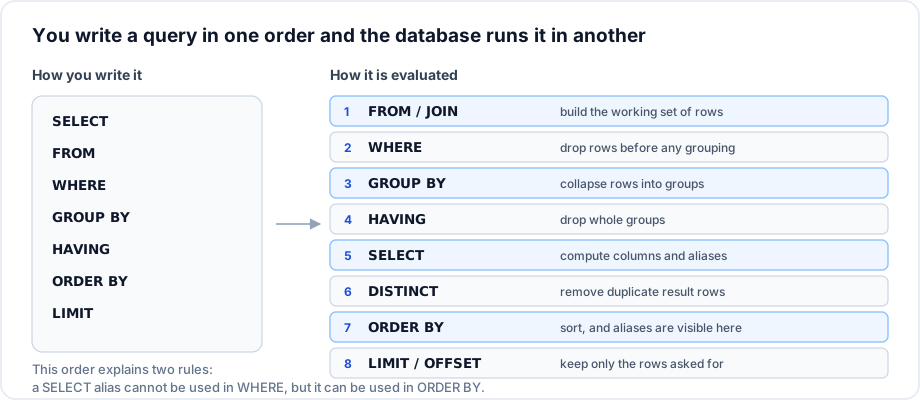
Written order is not execution order
The clause order above is fixed, but the database does not evaluate it top to bottom. This single diagram explains most beginner confusion about aliases and WHERE:
Example
-- A single line comment

/* A block comment,
   useful for temporarily disabling part of a statement. */

SELECT e.first_name AS given_name,        -- alias with AS
       e.salary * 12  AS annual_salary    -- an expression
FROM   employees AS e
WHERE  e.salary > 60000
ORDER BY annual_salary DESC;              -- alias is legal here
Explanation
annual_salary works in ORDER BY because SELECT has already been evaluated by then. Writing WHERE annual_salary > 700000 fails, because when WHERE runs the alias does not exist yet. The fix is to repeat the expression: WHERE e.salary * 12 > 700000.
Quoting
| What | Standard, PostgreSQL, Oracle | MySQL | SQL Server |
|---|---|---|---|
| String literal | 'text' | 'text' | 'text' |
| Quoted identifier | "my column" | `my column` | [my column] |
Important rules
- Single quotes are for values. Double quotes (or backticks) are for names. Getting this backwards is the most common syntax error in SQL.
- A single quote inside a string is escaped by doubling it:
'O''Brien'. - Keywords are case insensitive. Identifier case sensitivity varies: PostgreSQL folds unquoted names to lower case, Oracle folds to upper case, MySQL on Linux is case sensitive for table names but not on Windows.
- Whitespace and line breaks are insignificant, so format for humans.
Common mistakes
- Using a
SELECTalias insideWHEREorGROUP BY. - Naming a column with a reserved word (
order,group,user) and then needing quotes forever. - Forgetting the comma between select list items, or leaving a trailing comma before
FROM. - Writing
-- commentwithout the space after the dashes; MySQL requires the space (or a newline) for the single line form.
Best practices
- One clause per line, keywords upper case, indentation aligned. Reviewers read SQL far more often than they write it.
- Always qualify columns with a table alias once more than one table is involved.
- Use
ASfor column aliases even where it is optional; it makes the intent unmistakable. - Avoid quoted identifiers entirely by choosing plain
snake_casenames that are not reserved words.
Practice
- Fix this statement:
SELECT name, salary*12 AS annual FROM employees WHERE annual > 600000; - Write the same string literal for a person named O'Brien in a way MySQL and PostgreSQL both accept.
- Rewrite
select ID,NAME from EMPLOYEES where DEPT_ID=10using the formatting conventions above.